Install svn server on centos 6
SVN – Apache subversion
SVN – Subversion is a versioning and revision control system used by developers to track and keep up earlier versions of their source codes.In this article we can see how to setup svn server on centos 6.Lets start ,
Install svn server on centos 6
Update yum repositories and packages by typing the below command[root@krizna ~]# yum updateBefore installing SVN packages, you must install and configure apache ( Webserver ) .
Install and configure apache
Step 1 » Type the below command to install apache along with dependencies.[root@krizna ~]# yum install httpdStep 2 » Open the file /etc/httpd/conf/httpd.conf .
Find “#ServerName www.example.com:80″ (line no : 276 ) .
#
 #ServerName www.example.com:80
and add this line below . “ServerName youripaddress:80″
#
 #ServerName www.example.com:80
 ServerName 192.168.1.2:80
Step 3 » Issue the below command to start apache service .
[root@krizna ~]# service httpd startand type this below command to start apache service automatically while booting.
[root@krizna ~]# chkconfig --levels 235 httpd onNow open your server ip address in the browser . you can see the apache test page.
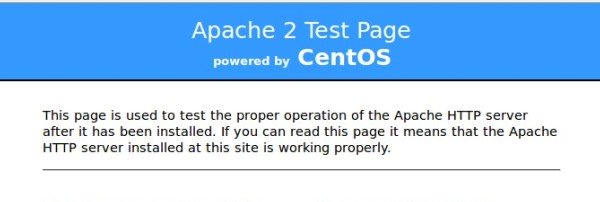
If you not able to see the apache test page, Disable the firewall ( iptables ) and selinux service on your server .
Disable firewall ( Iptables ) »
[root@krizna ~]# service iptables stop
 [root@krizna ~]# chkconfig iptables off
Disable Selinux » open the file /etc/selinux/config and find the line
SELINUX=enforcingand replace with
SELINUX=disablednow reboot the server and try again.
Install and configure svn server
Step 4 » Now start installing svn packages, Just type the below command .[root@krizna ~]# yum install subversion mod_dav_svnStep 5 » Now create new directory for svn repository.
[root@krizna ~]# mkdir /svnStep 6 » Create a new repository in the svn by issuing the below command
[root@krizna ~]# svnadmin create /svn/newrepStep 7 » Now issue the below commands one by one for necessary permissions.
[root@krizna ~]# chown -R apache.apache /svn/newrep/ [root@krizna ~]# chcon -h system_u:object_r:httpd_sys_content_t /svn/newrep/ [root@krizna ~]# chcon -R -h apache:object_r:httpd_sys_content_t /svn/newrep/ Step 8 » Now create a password file “newrep.users” with username “krizna” by typing below command
[root@krizna ~]# htpasswd -cm /svn/newrep.users kriznaStep 9 » Now open the SVN apache config file ( /etc/httpd/conf.d/subversion.conf ) and add the below lines at the end of the file .
Step 10 » Restart apache service
[root@krizna ~]# service httpd restartStep 11 » Now open your svn path http://yourserverip/repos/newrep in a browser( Ex: http://192.168.1.2/repos/newrep ) . you can see newrep revision page after typing username and password created (step 8).
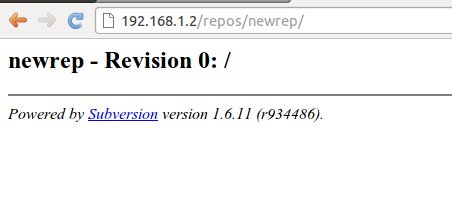
Step 12 » Create basic repository structure with the below commands
[root@krizna ~]# mkdir -p /tmp/svn/{trunk,branches,tags}[root@krizna ~]# svn import -m 'Initializing basic repository structure' /tmp/svn/ http://localhost/repos/newrep/Step 13 » Now you can see updated revision and structure details .
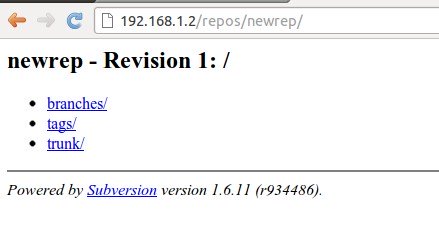
Enjoy ..
source: http://www.krizna.com/centos/install-svn-server-on-centos-6/

Không có nhận xét nào:
Đăng nhận xét